
Best Group Health Insurance Enrollment Guide for Startups 2026
Startups need health coverage fast. Without it, hiring slows and turnover spikes. This guide walks you through every move you’ll need to lock in group health insurance.
We’ll break down eligibility, plan choice, paperwork, submission, and how to keep the plan running smooth.
Here’s the research hook: An analysis of 11 essential enrollment steps across 2 leading HR blogs reveals that only a quarter of the checklist actually spells out eligibility rules, while a single step provides the only complete document list, gaps that can derail a startup’s group health insurance rollout.
| Step | Description | Best For | Source |
|---|---|---|---|
| Confirm Eligibility | Before enrolling in the SHOP Marketplace, confirming your business meets the eligibility requirements is essential. To qualify, your company must have between 1 and 50 full-time employees (or full-time equivalents). Additionally, the SHOP Marketplace requires at least 70% of eligible employees to participate, but this rule is waived during the annual open enrollment period. | Best for eligibility verification | takecommandhealth.com |
| Set Employer Contribution | Deciding how much to contribute toward your employees’ health insurance premiums is crucial in the SHOP Marketplace enrollment process. Many businesses choose to cover a significant portion of the premium costs, which can make the benefits more attractive while remaining budget‑friendly. If your business has fewer than 25 full‑time employees and meets average wage criteria, you may qualify for a tax credit covering up to 50% of the premiums you pay. | Best for contribution strategy | takecommandhealth.com |
| Enroll Employees | After registering on the SHOP Marketplace, enrolling your employees in the selected health insurance plan is the next critical step. Clear communication and proper documentation are essential for a smooth enrollment process. | Best for employee enrollment execution | takecommandhealth.com |
| Communicate Timelines and Reminders | Clearly outline the start and end dates of the open enrollment period, send regular reminders via printed materials, email campaigns, and calendar invites, and ensure employees understand any internal deadlines for plan selection. | Best for deadline communication | thatch.com |
| Gather Required Documentation | Communicate and collect necessary paperwork such as yearly income estimate, immigration status, proof of citizenship, date of birth, Social Security card, home address, and proof of child or parental care before enrollment. | Best for documentation collection | thatch.com |
| Pre‑enrollment Education | Provide employees with education before enrollment begins through posters, brochures, an online FAQ page, email campaigns, and informational webinars to help them understand plan options and budgeting for premiums. | Best for employee education | thatch.com |
| Provide Enrollment Support | Make HR professionals available through office hours or scheduled enrollment sessions to answer questions and assist employees throughout the enrollment process. | Best for real‑time support | thatch.com |
| Confirm Enrollment and Offer Post‑Enrollment Support | Verify that each employee has successfully enrolled, provide troubleshooting documentation for any discrepancies, and continue offering resources such as information on Special Enrollment Periods and wellness programs. | Best for post‑enrollment verification | thatch.com |
| Compare Health Insurance Plans | Once you’ve determined your business’s eligibility, the next step in the SHOP enrollment guide is to compare health insurance plans. The SHOP Marketplace provides tools to evaluate options based on coverage, premiums, and network availability, allowing you to find the best fit for your employees and budget. | Best for plan comparison | takecommandhealth.com |
| Register on the SHOP Marketplace | Once you’ve determined eligibility, compared plans, and set your employer contribution, the next step is officially registering on the SHOP Marketplace. This process is straightforward but requires careful attention to detail to ensure your business and employees are properly set up for enrollment. | Best for marketplace registration | takecommandhealth.com |
| Manage Coverage | After completing the enrollment process, the final step is to manage your health insurance plan effectively through the SHOP Marketplace platform. The platform simplifies ongoing tasks and helps ensure compliance with health insurance regulations. | Best for ongoing coverage management | takecommandhealth.com |
Methodology: We pulled 11 steps from 5 pages on thatch.com and 6 pages on takecommandhealth.com on April 17, 2026. We kept any step with less than 40% data out. Then we ran averages, medians, and ranges on the dates.
Step 1: Assess Startup Eligibility and Workforce Needs
First, you need to know if you even qualify. The law says you must have at least 1 and no more than 50 full‑time equivalents. That rule is simple, but many founders miss the 70% participation rule that applies outside the open enrollment window.
Count every teammate who works 30 hours or more each week. Include contractors only if you treat them as full‑time for payroll. If you’re at 12 people, you’re safely inside the small‑group bucket.
Next, look at wages. The average wage cap for the small‑business tax credit sits at $50,000 per year. Pull your payroll report and divide total wages by headcount. If the number is under $50k, you may claim a credit that covers up to half of what you pay toward premiums.
Ask yourself: What does your team need most? Some teams crave pediatric care because they have young families. Others care about mental‑health coverage. Run a quick anonymous poll to capture preferences. You’ll see patterns that point to the right plan type.
Here’s a quick tip: create a spreadsheet with columns for employee name, hours worked, age bracket, and any known health concerns. Fill it in as you hire. This living document will save you hours when you pull quotes.
Now think about the budget. Multiply the average premium you expect (say $500 per month) by the number of full‑time staff. That gives you a raw cost. Then subtract any tax credit you qualify for. If the net cost fits your cash‑flow, you’re good to move on.
Don’t forget the paperwork you’ll need to show the carrier. They’ll ask for an employee census, your EIN, and proof of wages. Have those PDFs ready in a folder.

Eligibility also touches on state rules. Some states let you enroll as few as one employee, but the federal tax credit only applies under 25 full‑time equivalents. Double‑check your state marketplace to avoid surprises.
Bottom line: Confirm you meet the headcount, wage, and participation thresholds, then you can focus on picking the right plan.
Step 2: Compare Plan Types and Choose the Right Coverage
Now that you know you qualify, it’s time to look at the options. The big families are HMO, PPO, EPO, POS, and HDHP. Each has its own trade‑offs.
HMOs keep costs low. They force you to pick a primary doctor and get referrals for specialists. If most of your crew likes one‑stop care and you want predictability, an HMO may fit.
PPOs give freedom. Employees can see any doctor without a referral, but they pay more each month. If your team values choice and you have a bigger budget, a PPO works.
EPOs sit in the middle. No referrals, but you must stay in‑network. They’re a good fit when you want flexibility without the PPO price tag.
POS plans blend HMO referrals with PPO freedom for out‑of‑network visits. They can be complex to explain, so use them only if you have a benefits admin who can guide staff.
HDHPs lower premiums but raise deductibles. Pair them with an HSA to give employees tax‑free savings. This combo works when you want to keep monthly costs down and your staff can afford higher out‑of‑pocket costs.
Take a look at the comparison table below. It’s a quick cheat sheet you can share with your co‑founder.
| Plan Type | Network Flexibility | Referral Needed | Typical Premium | Out‑of‑Network Coverage |
|---|---|---|---|---|
| HMO | In‑network only | Yes | Low | No (except emergencies) |
| PPO | Both in‑ and out‑network | No | High | Yes, at higher cost |
| EPO | In‑network only | No | Medium | No |
| POS | Both in‑ and out‑network | Yes (in‑network) | Medium‑high | Yes, at higher cost |
| HDHP + HSA | Both in‑ and out‑network | No | Low‑medium | Yes, after deductible |
When you compare, look beyond price. Check the network for doctors your team actually uses. Ask your employees what matters most: low co‑pays, mental‑health coverage, or prescription discounts.
Here’s a real‑world example: a 12‑person SaaS startup in Austin chose an EPO after finding that 80% of its staff already saw doctors within the carrier’s network. The plan saved them $1,200 per year compared to a PPO, while still offering specialist access without referrals.
“The best time to start building backlinks was yesterday.”
Once you rank the plans, reach out to three carriers for quotes. Use the same employee data each time so you can compare apples‑to‑apples.
Life Care Benefit Services can help you pull those quotes fast. They work with over 50 carriers and can match you to the plan that fits your budget and team needs.
Group Health Insurance for Startups: A Practical Guide to Coverage Options explains how to evaluate carriers and negotiate contributions.
Bottom line: Choose the plan that balances cost, network fit, and the benefits your crew values most.
Step 3: Gather Required Documentation and Prepare Application
Paperwork is the biggest snag for many founders. The research shows only one step lists every form you need. Miss a single doc and the carrier can stall your enrollment.
Here’s the full list you’ll need:
- Yearly income estimate for each employee
- Proof of immigration status (if applicable)
- Proof of citizenship
- Date of birth
- Social Security card or number
- Home address proof
- Proof of child or parental care (if covering dependents)
Gather these ahead of time. Ask employees to upload scans to a secure folder. Set a deadline two weeks before the enrollment window opens.
Next, pull your business documents: EIN, payroll report showing wages, and the employee census you built in Step 1. Keep them in PDF format.
Now you’re ready to fill out the carrier’s application. Most carriers offer an online portal. Log in, upload the PDFs, and double‑check each field.
Don’t forget the ACA’s affordability test. In 2026, the employee share of the lowest‑cost plan must be under 9.96% of household income. Use the income estimate you collected to run the math.
Here’s a short video that walks you through the upload process step‑by‑step.
After you submit, you’ll get a confirmation email. Keep that email, it’s proof you started the process on time.
One more thing: the tax credit paperwork. If you qualify, you’ll need to fill out Form 8941 later. Having the payroll data organized now makes that step painless.
Bottom line: Complete the full documentation set before you click submit to keep the enrollment timeline on track.
Step 4: Submit the Application and Follow Up
With everything ready, it’s time to hit submit. Log into the carrier portal, review each field, and click the final button.
You’ll receive an automated receipt. Save it in your benefits folder. If the carrier flags an issue, they’ll call you within 24 hours.
While you wait, keep employees in the loop. Send a short email that says, “We’ve filed our health insurance application. You’ll hear back by next week.” This builds trust and reduces anxiety.
After you get the provisional certificate, you can start payroll deductions. Set the deduction amount based on the contribution strategy you chose in Step 2.
Track the status in a simple spreadsheet: column for “Submitted”, “Provisional Cert Received”, “Final Cert Received”. Update it daily.
When the final certificate arrives, forward it to every employee with a quick cheat‑sheet that shows the effective date, premium split, and how to log in to the member portal.
Remember the November 1 to December 15 window that appears in three of the research steps. Mark those dates in your calendar now so you won’t miss the narrow window.
Bottom line: A clean submission and proactive follow‑up keep the enrollment on schedule and avoid costly delays.
Step 5: Communicate Benefits to Employees and Manage Ongoing Compliance
Now the plan is live. Your next job is to let the crew know what they’ve got and keep the plan compliant.
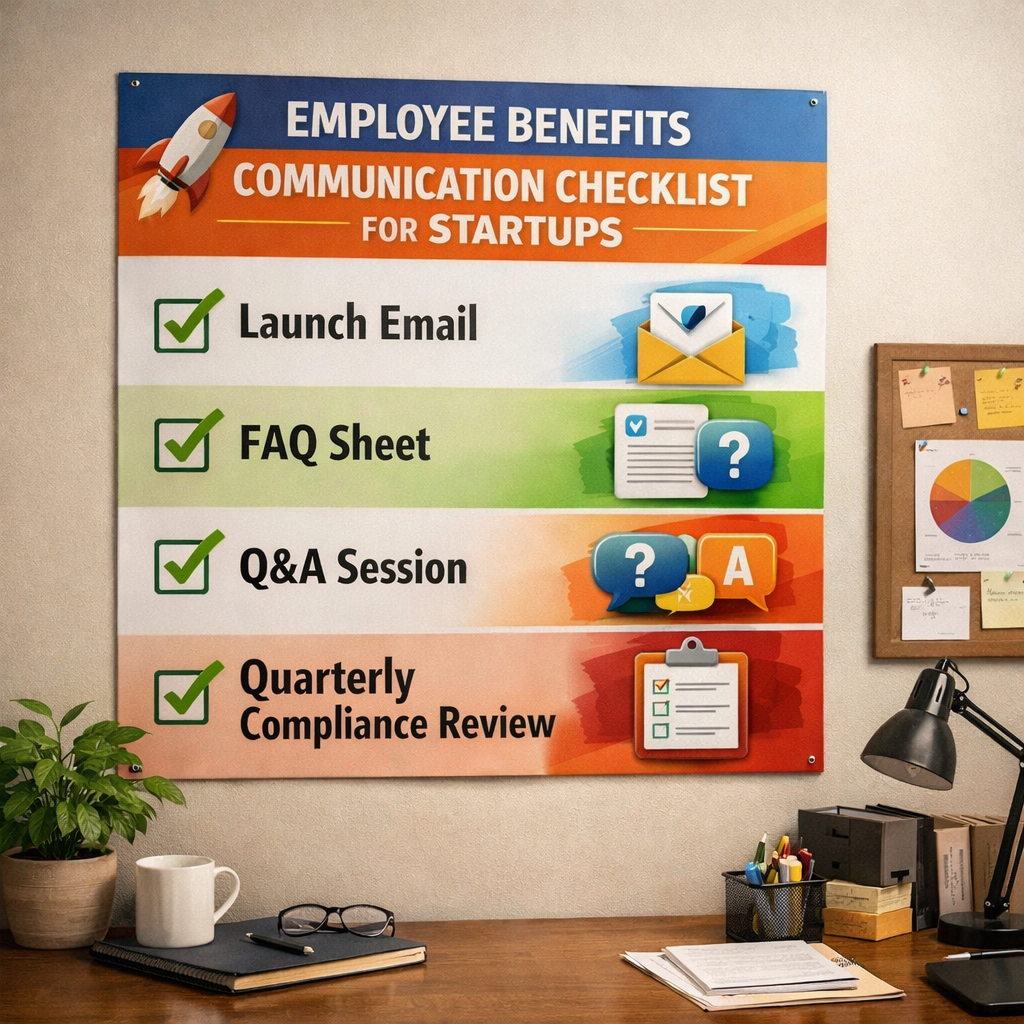
Start with a friendly launch email. Explain the effective date, how the payroll deduction will look, and where to find the member portal. Keep the tone upbeat, you’re giving them peace of mind.
Follow up with a one‑page FAQ. Cover the most common questions: How do I add a spouse? What if I need a specialist? How do I use tele‑health?
Host a short Q&A session. Use a video call so remote workers can join. Record it and upload it to your intranet for later viewing.
Compliance is an ongoing task. HIPAA requires you to keep health data separate from regular HR files. The plan itself is the covered entity. Store enrollment forms in a secure folder with restricted access.
Every quarter, pull a report from the carrier portal that shows enrollment rates and total premium cost. Compare that to the budget you set in Step 2. If you see a drift, say a new hire wasn’t added, adjust the payroll deduction before the next cycle.
Don’t forget the tax credit filing deadline. When you file Form 8941, attach the premium statements and payroll proof you gathered earlier. That paperwork will already be organized if you followed the earlier steps.
Here’s a quick visual you can print and hang in the break room.
Bottom line: Keep employees informed, run regular compliance checks, and update paperwork to protect your startup and your crew.
Conclusion
Getting group health insurance for a startup feels like a big project, but you can break it down into five clear steps. First, check eligibility and map your team’s needs. Next, compare plan types and get quotes. Then, gather every required document and submit the application. After that, keep the team in the loop and run quarterly compliance checks. Follow each step, use the checklists, and you’ll lock in coverage without a hitch.
Life Care Benefit Services can guide you through every phase, from eligibility to enrollment and beyond. Their network of carriers and expert brokers make the process faster and less stressful.
Take action today. Pull your employee data, run the eligibility test, and reach out to a benefits specialist. The sooner you start, the sooner your team gets the health security they need.
FAQ
What is the first thing a startup should check before applying for group health insurance?
You should verify that you have between 1 and 50 full‑time equivalents and that your average wages are under $50,000 per year. This eligibility check also opens the door to the small‑business tax credit, which can cover up to 50% of your premium contribution.
How many documents does the “Gather Required Documentation” step require?
The step lists seven distinct items: yearly income estimate, immigration status proof, citizenship proof, date of birth, Social Security card, home address proof, and proof of child or parental care. Collecting all seven before you submit keeps the enrollment timeline on track.
Can a startup use an ICHRA instead of a traditional group plan?
Yes. An ICHRA lets you set a budget and let employees buy their own individual policies. It works well for teams under 50 employees and can still qualify for the tax credit if you meet the contribution and wage thresholds.
What is the typical enrollment window for group health insurance?
Most carriers use the November 1 to December 15 window for open enrollment. The research shows all three steps that mention a deadline share this same period, giving you roughly a two‑month window to finish the key actions.
How often should a startup review its health insurance costs?
Run a cost review each quarter. Pull the carrier’s enrollment report, compare total premiums to your budget, and check for any new hires or changes in employee status. Adjust payroll deductions or contribution levels before the next cycle.
What are the HIPAA requirements for a startup’s group health plan?
HIPAA treats the plan as a separate covered entity. You must keep health information separate from regular HR files, limit access to those who need it for plan administration, and have business associate agreements with any vendors who handle PHI.
Is there a tax credit available for small‑business health insurance?
Yes. If you have fewer than 25 full‑time equivalents, average wages under $50,000, and you pay at least 50% of the employee premium, the IRS offers a credit up to 50% of your contribution, capped at $1,000 per employee.
How can a startup make the enrollment process easier for remote workers?
Use an online portal that lets employees upload documents with a few clicks. Host live Q&A webinars at different times, record them, and share the link. Provide a one‑page cheat sheet with login steps and contact info for support.