

How to Use a Group Health Insurance Tax Credit Calculator
Health insurance costs can be a mystery. One month you pay one amount, next month it jumps. The government created the premium tax credit to help. But how do you know if you qualify or how much you’ll get? That’s where agroup health insurance tax credit calculatorcomes in.
This guide will walk you through each step. You’ll learn who qualifies, what numbers you need, how to use the calculator, and how to apply the credit on your taxes. By the end, you’ll be able to estimate your savings with confidence. Let’s get started.
Step 1: Understand Who Qualifies for the Premium Tax Credit
Before you open any calculator, you need to know if you’re eligible. The premium tax credit is for people who buy health insurance through the Marketplace (also called the exchange). But not everyone qualifies.
First, your household income must be between 100% and 400% of the federal poverty level. For 2026, that means about $15,060 to $60,240 for a single person, and higher for larger families. Second, you must be a U.S. citizen or legal resident. Third, you can’t have access to other affordable coverage through an employer or a government plan like Medicare or Medicaid.
But here’s a twist: even if you get a state subsidy, it doesn’t reduce your federal credit. According to the federal regulations, payments from a state tax credit or premium subsidy made directly to the employer are ignored when calculating the credit. That means you can stack both benefits.
For small employers, the rules are different. The Small Business Health Care Tax Credit lets you claim up to 50% of premiums if you have fewer than 25 full-time equivalent employees, pay at least half of each employee’s premium, and average wages are under $56,000. But that credit is limited to two consecutive taxable years.
Let’s say you’re a small business with 12 employees. You pay 60% of each employee’s premium. Your average wage is $45,000. You would qualify for a partial credit because of the phase-out rules. But if you have 30 employees or your average wage is $60,000, you won’t qualify at all.
Bottom line:Check your eligibility first: income between 100-400% FPL, no other affordable coverage, and for employers, fewer than 25 FTEs and average wages under $56,000.
Step 2: Gather Your Financial Information
To use agroup health insurance tax credit calculator, you need accurate numbers. The calculator will ask for your household income, family size, ages, and location. Don’t guess. Gather real documents.
Start with your most recent tax return. Your modified adjusted gross income (MAGI) is the key number. MAGI is your adjusted gross income plus certain tax-exempt interest and Social Security benefits. It does not include gifts or inheritance.

You’ll also need your family size. Count everyone you claim as dependents on your tax return. For each person, note their age because the calculator uses age to estimate premium costs. Your ZIP code matters too. Premiums vary by location, so the calculator needs your rating area.
For employers, gather payroll records. You need the total number of full-time equivalents (FTEs) and the average annual wages. The IRS Premium Tax Credit overview explains that the credit is reduced if you have more than 10 FTEs or average wages over $25,000 (adjusted for inflation). You also need the total employer-paid premiums for the year.
Bottom line:Collect your MAGI, family size, ages, ZIP code, and employer payroll data before opening the calculator. Accurate inputs give accurate estimates.
Step 3: Use the Calculator , Field-by-Field Walkthrough
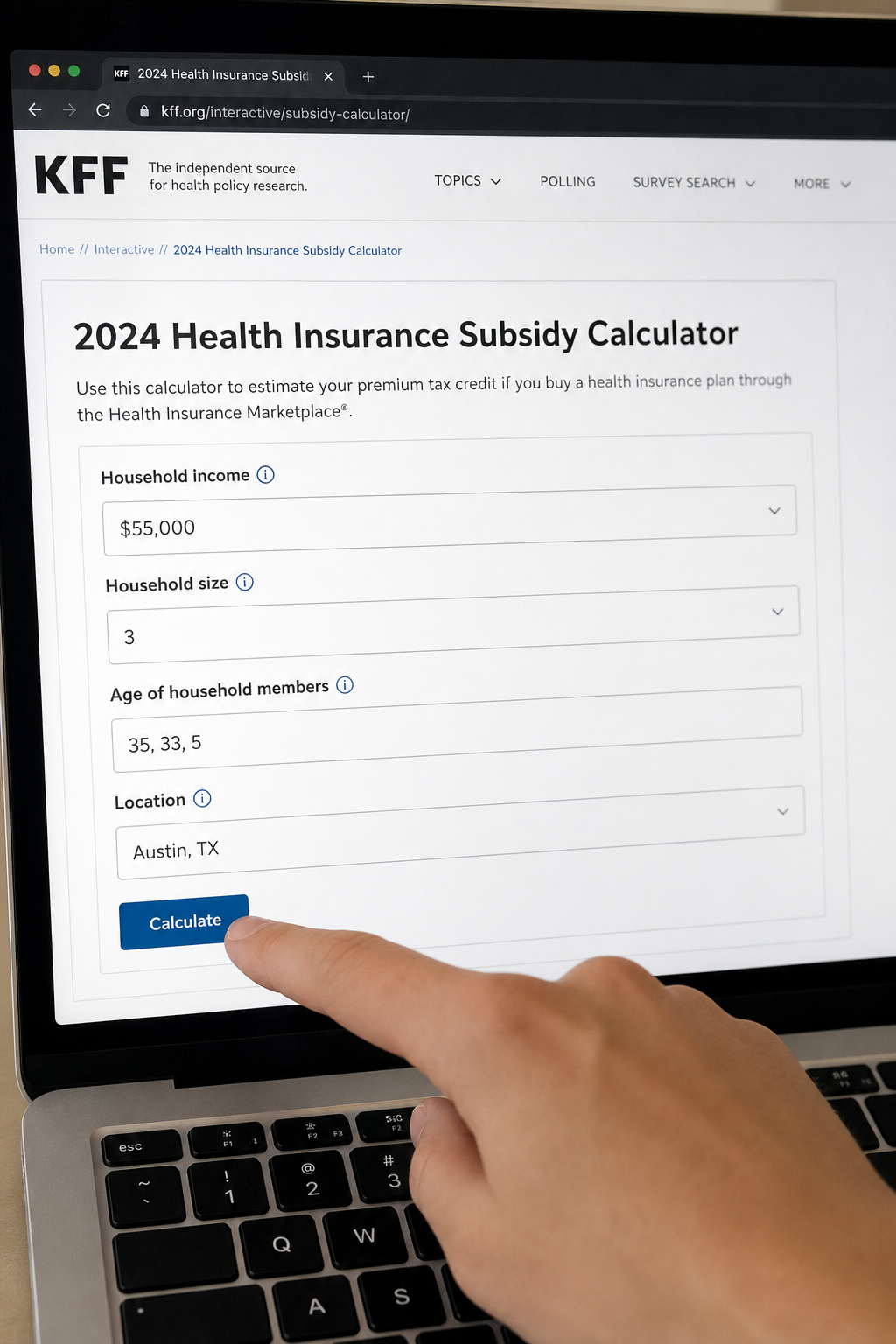
Now you’re ready to use agroup health insurance tax credit calculator. The most popular one is from the Kaiser Family Foundation (KFF). It’s free and easy to use. Let’s walk through each field.
Go to the KFF subsidy calculator page. You’ll see a form with several sections. First, select the tax year , use the current year or the year you’re estimating for.
Field 1: Income.Enter your monthly household income. For example, if your annual MAGI is $60,000, divide by 12 to get $5,000 per month. The calculator works with monthly numbers.
Field 2: Family size.Enter the number of people in your household. Include yourself, your spouse, and all dependents.
Field 3: Ages.Enter the age of each person. Age affects the premium because older people pay more. The calculator uses age brackets.
Field 4: Location.Select your state and county. This tells the calculator which rating area you’re in. Premiums vary by location.
Field 5: Filing status.Choose single, married filing jointly, head of household, etc. This affects income thresholds.
Field 6: Benchmark plan cost.The calculator automatically estimates the cost of the second-lowest cost silver plan in your area. This is the benchmark. You can also enter your own plan’s cost if you have a specific plan in mind.
Field 7: Advanced credit.If you’re already receiving advance premium tax credits, you can enter that amount. The calculator will show how it affects your final credit.
After filling in all fields, click “Calculate.” The tool will show your estimated premium tax credit for the year. For example, a family of four with an income of $55,000 might get a credit of $6,156 per year.
You can adjust the income slider to see how changes affect your credit. This is powerful for planning. If you expect a raise, you can see how it reduces your credit. If you contribute to a retirement account, you can see how it increases your credit.
Bottom line:Enter accurate numbers into each field: income, family size, ages, location, and filing status. The calculator does the math and shows your estimated credit.
Step 4: Interpret Your Results , Benchmark Plan and Credit Amount
The calculator gives you a dollar amount. But what does it mean? Let’s break it down.
The credit is based on the benchmark plan , the second-lowest cost silver plan in your area. You are not required to buy that plan. You can use the credit for any metal tier (bronze, silver, gold, platinum). But the credit amount is the difference between the benchmark premium and your expected contribution.
Your expected contribution is a percentage of your income. The IRS uses a sliding scale. For example, in 2026, someone at 200% of the poverty level contributes about 2% of their income. Someone at 400% contributes up to 8.5%. So if your income is $55,000 (200% FPL), you would pay about $1,100 per year toward the benchmark plan. If that plan costs $6,000, your credit is $4,900.
Here’s a table showing how income level affects your contribution percentage:
| Income % of FPL | Maximum Contribution % of Income |
|---|---|
| 100-150% | 2.0% |
| 150-200% | 4.0% |
| 200-250% | 6.0% |
| 250-300% | 8.0% |
| 300-400% | 8.5% |
The credit is refundable, meaning you get the money even if you don’t owe taxes. And you can take it in advance , the government pays your insurer each month , or as a lump sum when you file your taxes.
According to the IRS Q&A on the premium tax credit, the credit is limited to the actual cost of the plan you choose. If you pick a bronze plan cheaper than the benchmark, your credit is based on the cheaper plan’s premium.
“The premium tax credit is designed to make health insurance affordable by limiting how much of your income goes toward premiums.”
Bottom line:Your credit equals the benchmark premium minus your expected contribution. It’s refundable and can be taken in advance or at tax time.
Step 5: Apply the Credit and Reconcile on Your Tax Return
Once you have your credit estimate, you need to apply it correctly on your tax return. This is where many people get confused. But it’s simple if you follow the steps.
If you chose to get the credit in advance, your insurer already reduced your monthly premiums. At tax time, you must reconcile the advance credit with the actual credit you qualify for based on your final income. This is done using Form 8962, Premium Tax Credit.
You’ll receive Form 1095-A from the Marketplace. It shows the monthly premiums for the benchmark plan, the total premiums for your plan, and the advance credit paid. Use this information to complete Form 8962. The form calculates the actual credit you should have received.
If your actual income was lower than you estimated, you may get more credit as a refund. If your income was higher, you may have to pay back some or all of the advance credit. The repayment is capped based on your income. For example, if your income is under 200% FPL, the repayment limit is $325 for an individual.
The Healthcare.gov reconciliation page explains that even if you didn’t take advance credit, you can still claim the credit on your return by filing Form 8962. You’ll then receive the credit as a refundable amount on your tax return.
Bottom line:Use Form 8962 to reconcile your advance credit with your actual credit. Any difference becomes part of your tax refund or amount owed.
Step 6: Special Considerations: Self-Employed, SHOP, and Reducing AGI
Some situations need extra attention. Here are three important ones.
Self-Employed Individuals
If you’re self-employed, you can deduct your health insurance premiums from your net self-employment income. This reduces your AGI, which can increase your premium tax credit. The TurboTax guide to self-employed health deductions explains that you use Form 7206 to claim the deduction. But be careful: the deduction cannot exceed your net profit from the business.
For example, if you earn $80,000 as a freelancer and pay $10,000 in health insurance premiums, you can deduct the $10,000. Your MAGI becomes $70,000, which might lower your contribution percentage and increase your credit.
SHOP Marketplace for Small Employers
The Small Business Health Options Program (SHOP) is a separate marketplace for employers. You can use the SHOP tax credit estimator to see if you qualify for the small business health care tax credit. The SHOP credit works differently , it’s based on employer-paid premiums, not household income. If you have fewer than 25 FTEs, you may qualify for up to 50% of your contribution.
Reducing Your AGI to Increase the Credit
Your AGI directly affects your credit. The lower your AGI, the larger your credit. You can reduce your AGI by contributing to a Health Savings Account (HSA), a traditional IRA, or a SEP IRA. For example, a $5,000 contribution to an HSA lowers your MAGI by $5,000, which could bump you into a lower contribution percentage tier.
Bottom line:Use every legal strategy to lower your MAGI, like deductible retirement contributions or HSAs. For small businesses, the SHOP credit can complement the individual premium tax credit.
Frequently Asked Questions
What is a group health insurance tax credit calculator?
A group health insurance tax credit calculator is an online tool that estimates how much premium tax credit you or your small business may qualify for. You enter your income, family size, age, and location, and the calculator uses IRS formulas to show your estimated monthly credit. It’s a planning tool, not a guarantee. The final credit is calculated on your tax return using actual income.
How do I know if I qualify for the premium tax credit as an individual?
You qualify if your household income is between 100% and 400% of the federal poverty level, you buy insurance through the Marketplace, and you don’t have access to affordable employer coverage or government programs like Medicaid. Your citizenship or legal residency is also required. Use a group health insurance tax credit calculator to check your eligibility with your specific numbers.
Can small employers use a group health insurance tax credit calculator?
Yes, but small employers use a different calculator. The SHOP tax credit estimator helps determine if you qualify for the Small Business Health Care Tax Credit. This credit is based on employer-paid premiums, number of FTEs, and average wages. The individual premium tax credit calculator is for employees buying their own coverage. Both are important tools for small business owners.
What documents do I need to use the calculator?
You need your most recent tax return to find your AGI, family size, and filing status. You also need your ZIP code and the ages of everyone in your household. If you’re using the SHOP calculator, you’ll need payroll data including full-time equivalent counts and total employer-paid premiums. Having these ready makes the calculator accurate.
How does the calculator handle changes in income?
Most group health insurance tax credit calculators allow you to adjust the income slider to see how changes affect your credit. If your income goes up, your credit goes down, and vice versa. It’s a good idea to estimate conservatively to avoid having to repay advance credits. You can also update your income with the Marketplace during the year.
What is the benchmark plan and why does it matter?
The benchmark plan is the second-lowest cost silver plan in your area. Your credit is calculated based on that plan’s premium, even if you buy a different plan. If you pick a cheaper plan, your credit is limited to that plan’s cost. If you pick a more expensive plan, you pay the difference. The calculator automatically uses the benchmark for accurate estimates.
Can I get the credit in advance or only at tax time?
You can choose either. If you take the credit in advance, the IRS pays your insurer each month, reducing your premiums. This is called the advance premium tax credit. You must then reconcile it on your tax return. If you prefer, you can pay full premiums and claim the refundable credit when you file. The group health insurance tax credit calculator can show you both scenarios.
What if I receive a state subsidy? Does it affect my federal credit?
No, according to IRS regulations, state subsidies paid directly to the employer do not reduce the federal premium tax credit. This means you can benefit from both. However, if you receive a state subsidy that goes directly to your insurance company, it might affect the benchmark plan cost. Use the calculator with your state-specific information to see the combined effect.
Conclusion
Using a group health insurance tax credit calculator is the smartest way to plan your health insurance budget. You’ve learned the eligibility rules, the necessary documents, the step-by-step input process, and how to interpret the results. You also know how to apply the credit on your taxes and special strategies for self-employed individuals and small business owners.
Remember, the calculator is an estimate. Your actual credit depends on your real income at the end of the year. To avoid surprises, update your Marketplace application whenever your income changes. And if you’re a small business owner, don’t forget to explore the SHOP tax credit as well.
If you need personalized help, consider contacting a trusted insurance advisor like Life Care Benefit Services. They can walk you through the process, help you choose the right plan, and ensure you maximize every tax credit available. Start by running your numbers through the calculator today and take control of your health insurance costs.
This article is for informational purposes and does not constitute tax advice. Consult a qualified tax professional for your specific situation.